Setup101 for streamers
"What mic is that?" One link answers it.
Setup101 lets streamers put their whole setup — PC, mic, camera, lights and peripherals — on one page with one link. Use it in your stream panel, a !gear chat command and your video descriptions; when you upgrade, change the setup and every link shows the new kit.
Last updated October 5, 2026
Ideas
What you could put in a setup.
The stream desk
- Microphone and arm
- Webcam or camera
- Key lights
- Stream deck
- Audio interface
The gaming rig
- GPU
- Monitor
- Keyboard
- Mouse
- Headset
Software
- Streaming software
- Chat bot
- Overlay tool
- Noise suppression
Example product types, not recommendations.
One link, everywhere
Where to put your setup link.
| Where | What to write | Why it works |
|---|---|---|
| Stream panel | "My setup" panel linking to your setup | Viewers check panels when they want to know what you use. |
| Chat command | !gear → your setup link | Your bot answers the most common question in chat for you. |
| YouTube description | "Gear:" + your link | VODs and highlights keep the link working long after the stream. |
| X and Discord | Pinned post or channel | One link your community can always find. |
When something changes, edit the setup — the link stays the same. How permanent links work
How it works
Three steps, about ten minutes.
- 01
Build the setup
Add your gear and software, with a note on settings people ask about (mic gain, camera picture profile).
- 02
Add your links on Pro
On Pro, link each item to where you bought it and add any sponsor promo codes.
- 03
Use it everywhere
Put the same link in your panel, chat command and descriptions. Upgrade the mic, update the setup — done.
Made on Setup101
Real setups in gaming.
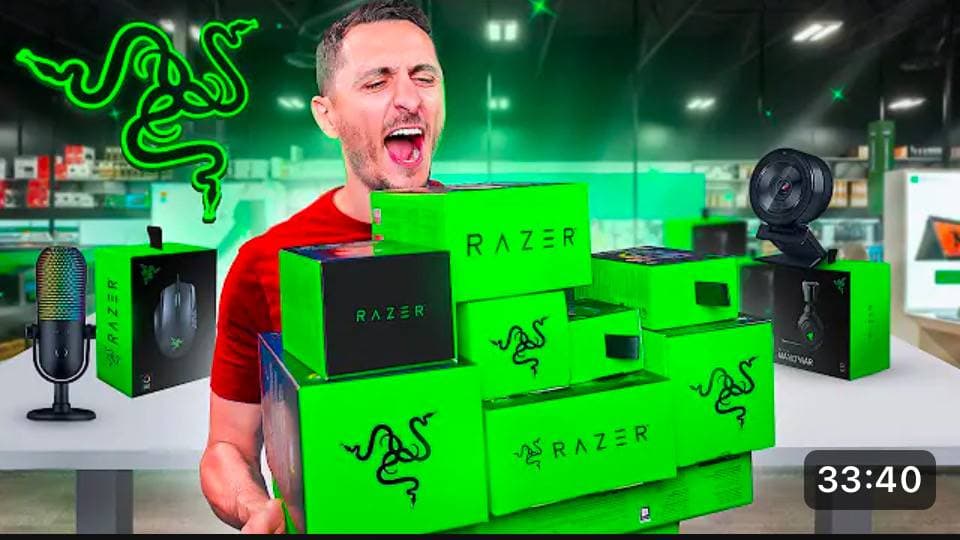
Building an all Razer Streaming Setup
 by baljutla
7 products
 Buy
BuyIskur Gaming Chair
Razer · $1,535
 Buy
BuyThunderbolt 4 Dock with 100W
Plugable · $270
 Buy
BuyFirefly V2 pro
Razer · $182
 Buy
BuyBasilisk V3 Pro
Razer · $129
What Setup101 doesn't do
- Setup101 doesn't add overlays or connect to your streaming software; it's a page for your gear.
- It doesn't replace your sponsor's tracking; promo codes are shown on your products for viewers to copy.
Questions, answered
What streamers ask first.
How do I set up a !gear command?
In your chat bot, create a command (such as !gear or !setup) whose reply is your Setup101 setup link. When your gear changes, you only update the setup.
Can I list software as well as hardware?
Yes. Apps and software can go in the same setup as your hardware.
Can I earn from my gear list?
On Pro, add affiliate links and promo codes to each item. Commission goes to your own accounts; Setup101 doesn't take a cut.
I have a streaming desk and a separate gaming rig. One setup or two?
Either. Two setups gives each its own link. The free plan allows one setup per category, Pro two and Pro Plus three.