How do I enrol in and take a 101 Course?
Available on:Everyone (free Setup101 account)Last updated
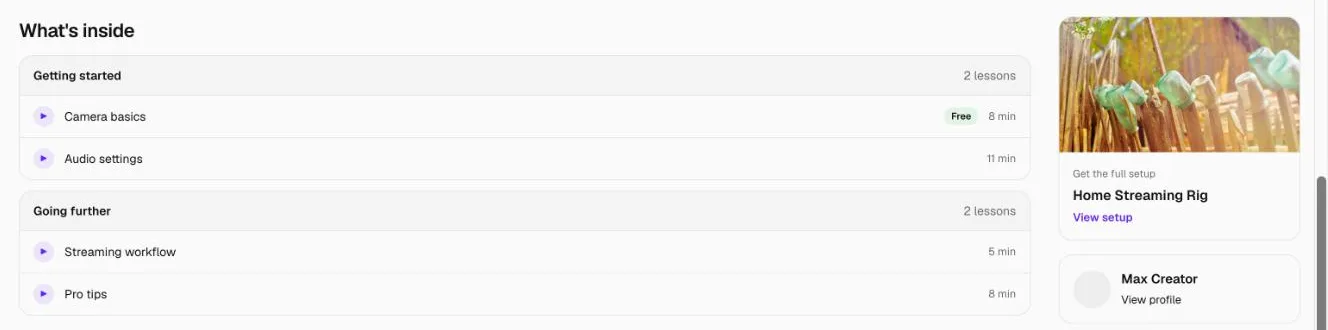
Open the course and click Enrol for free. You'll go straight to the first lesson. Mark each lesson complete as you go; your progress is saved, and the course page shows Continue with the next lesson whenever you come back.
Lessons marked as a free preview can be watched without enrolling.
How to take a course
- Find a course: under Learn this setup on a setup page, Learn to use it on a product page, on a creator's profile, or from a link they've shared.
- Click Enrol for free. Sign in or create a free account if you're asked.
- Watch the lesson, then click Mark as complete.
- Click Next lesson, or pick any lesson from the list beside it.
- Come back any time: the course page shows your progress and a Continue button.
When you finish the last lesson you'll see You finished this course, and Watch again if you want to go back through it.
What else can I do on a course?
- Watch the free lesson before enrolling, if the creator has made one a free preview.
- Save the course to find it later in Saved → Courses.
- Like and Share it.
- Ask questions or say thanks in Comments.
- See the gear: Gear in this lesson beside each lesson, and Shop this course on the course page.
FAQ
Do I have to pay?
No. 101 Courses are free to take.
What if the creator removes the course?
If you're enrolled, you keep access to it even if the creator unpublishes or deletes it.
Why do some product buttons say "View product"?
That product opens its page on Setup101 instead of a shop. Creators on Pro can add buy links.
Related
More in 101 Courses
- What is a 101 Course on Setup101?
- How do I create a 101 Course?
- How do I add sections and lessons to a 101 Course?
- How do I add product cards to a 101 Course lesson?
- How do I publish and share my 101 Course?
- How do I link a course I sell on Teachable or Udemy?
- How do I see who's taking my 101 Course?
- How do I edit, unpublish or delete a 101 Course?
- Which video sites can I use in a 101 Course?
Still stuck? Email support@setup101.co.