Permanent links
One link per setup. It never goes stale.
Put one Setup101 link in your videos, posts, podcast episodes and newsletters instead of a list of product links. When a product is discontinued or you upgrade your gear, change it in the setup, and every old link still leads to the right products, with your affiliate links.

Green Desk Setup: full setup tour
Description
Everything I use, in one place 👇
setup101.io/setup/green-desk-setup

Green Desk Setup
 Buy
iPhone 16 Pro
Apple · $700
 Buy
Good Vibes Neon Sign
Olekki · $17
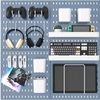 Buy
Pegboard
Mulsame · $32
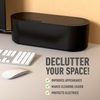 Buy
Cable Management Box
D-Line · $24
The problem: videos and posts last for years, product links don't
A good video, post or episode keeps getting found long after you publish it. The products you linked in it don't keep still: they're discontinued, go out of stock, get replaced by a new model, or the service behind the link shuts down. Each time, a viewer who wanted the product hits a dead page, and the commission goes nowhere. Fixing it means finding and editing every description, post and page.
Video description · posted 3 years ago
IllustrationGear I use in this video:
- Cameraamzn.to/3kX…Discontinued
- Microphoneamzn.to/2Pq…Page not found
- Desk lampamzn.to/3bR…Working
- Keyboardshop.example/kb-…Currently unavailable
- Monitor armgearlink.example/…Service shut down
What your viewer sees
404
Sorry, we couldn't find that page.
No sale, no commission
How it works
How permanent setup links work
- 01
Make a setup
A setup is a page for one set of gear: your desk, your camera bag, the kit in one video or post. Add each product with a photo, a short note and your affiliate link from any retailer.
- 02
Share its link once
Put the setup's link in your video description, post, bio, podcast episode or newsletter, instead of a list of individual product links.
- 03
Change the products, not the link
When a product is discontinued, goes out of stock or gets replaced by a better one, edit the setup. The link stays the same, so everything that points to it shows the current gear.
Your video
Your setup link
setup101.io/setup/green-desk-setup
Never changesThe products you choose today
iPhone 16 Pro
Apple · $700
Good Vibes Neon Sign
Olekki · $17
Pegboard
Mulsame · $32
Alerts
Broken-link alerts, before your viewers notice
Setup101 checks the product links in your setups and tells you when one stops working: a page that's gone, a product that's unavailable, or a link that's slow or timing out. Swap it in the setup and everywhere that points there is fixed. Want to check links you already have? Try the free affiliate link checker.
A product link stopped working
Pegboard · “Green Desk Setup”
The retailer page returns “not found”.
Pegboard
Mulsame · $32
- Buy
Cable Management Box
D-Line · $24
Swapped. Everywhere that links here is fixed.
Placement
Where to put your setup link
- YouTube video descriptions and pinned comments
- TikTok and Instagram bios, and Instagram story link stickers
- Podcast episode descriptions (show notes) and newsletter footers
- Blog posts and gear guides on your own website
- Your Setup101 profile, which doubles as a link in bio for all your setups
YouTube description
Full desk setup, every product 👇
setup101.io/setup/green-desk-setup
Pinned comment
Links to everything are here:
setup101.io/setup/green-desk-setup
Instagram bio
Desk tours every Sunday ↓
setup101.io/setup/green-desk-setup
TikTok bio
gear + desk links ↓
setup101.io/setup/green-desk-setup
Podcast show notes
Everything mentioned on the show:
setup101.io/setup/green-desk-setup
Newsletter footer
My current setup:
setup101.io/setup/green-desk-setup
Honest limits
What permanent links don't do
- It doesn't replace your affiliate programs. You still earn through your own Amazon Associates, Impact or other accounts, using the links you paste in.
- It can't change links already in old videos, posts or episodes. Swap those once for your setup link, and from then on you won't need to edit them again.
- If you delete a setup, its link stops working. Edit or archive products instead.
Alternatives
Compared with the alternatives
| Approach | How it works | Trade-off |
|---|---|---|
| Editing descriptions by hand | Open each old video in YouTube Studio and replace the link. | Free, but slow, and you repeat it every time a product changes. |
| Bulk find and replace (e.g. TubeBuddy) | Replace one URL with another across many video descriptions. | Faster, but you still need to know which links broke, and it's YouTube-only. |
| Smart links per product (e.g. Geniuslink) | Each product gets its own redirect link that you can repoint. | Keeps single links alive and can route by country, but there's no page showing the whole kit. |
| A page on your own website | Link to a gear page you maintain yourself. | Full control, but you build and update it by hand. |
| A Setup101 setup | One link per setup; swap products inside it. | One link covers the whole kit, with your affiliate links, and works on every platform. Free to start. |
More detail: Setup101 vs Geniuslink, Setup101 vs Bitly. Every setup also has a short link with your name on it: how short links work. Already have links in old videos? See how to update affiliate links in old YouTube descriptions.
Questions, answered
Common questions
What happens to the link when I swap a product?
Can I use my existing affiliate links?
Do I have to change my old videos and posts?
Is it free?
Is a permanent link the same as a short link?
How do I find links that are already broken?
Make your first setup
Free to start, on the web, iOS and Android. See pricing for what each plan includes.