What is a 101 Course on Setup101?
101 Course is a free Setup101 feature that lets creators build short courses on the gear and apps in their setups: sections and lessons with video, text and product cards, connected to the setup they teach. Learners enrol for free, track their progress, and find courses on the creator's setups, products, profile and link in bio.
Every creator can build as many 101 Courses as they like.
How does a 101 Course work?
- You create a course and connect it to a setup and the products or apps it teaches.
- You add sections and lessons. Each lesson can have a video, text, images and product cards.
- You publish it. It gets its own page at setup101.io/course/your-course-name and shows on your setups, products and profile.
- People enrol for free, work through the lessons and track their progress.
- You see views, enrolments and completions in Insights.
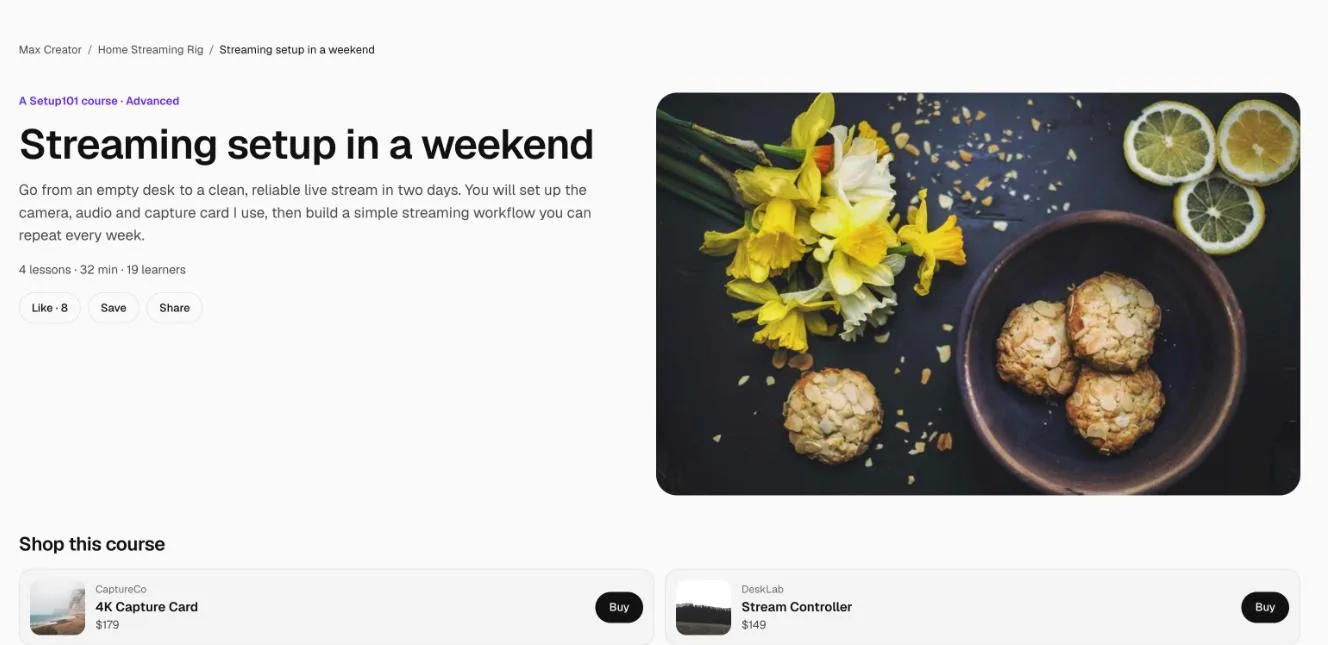
Where do people find my course?
- Setup pages: a Learn this setup section on the setup the course is connected to.
- Product pages: a Learn to use it section on the products it teaches.
- Your profile and your link in bio.
- Its own page, which you can share anywhere: in video descriptions, posts and messages.
There's no separate course directory or search. Courses are found through the setups and gear they teach, which is the point: someone looking at your camera learns how you use it.
The numbers
| Setting | Value |
|---|---|
| Courses you can build | Unlimited, on every plan |
| Price for learners | Free. Paid courses are coming soon. |
| Lesson video | A link from YouTube, Vimeo, Loom or Wistia |
| Size | Up to 30 sections and 200 lessons per course |
| Linked courses (hosted on Teachable, Udemy and similar) | 1 on Free, 3 on Pro, unlimited on Pro Plus |
| Courses in your link in bio | 1 on Free, 3 on Pro, 5 on Pro Plus |
| Links inside lesson text | Pro and Pro Plus |
| Full Insights (product clicks by lesson, where learners stop) | Pro and Pro Plus |
FAQ
Is 101 Course free?
Yes. Every plan can build unlimited courses, and learners enrol for free.
Can I charge for my course?
Not yet. Paid courses are coming soon. Until then, every published 101 Course is free to take.
Can I add a course I already sell somewhere else?
Yes. Link it and it shows as a small row under your 101 Courses, linking to the other site.
Where are the videos hosted?
On YouTube, Vimeo, Loom or Wistia. You paste the link into the lesson. See which video sites you can use.
Related
More in 101 Courses
- How do I create a 101 Course?
- How do I add sections and lessons to a 101 Course?
- How do I add product cards to a 101 Course lesson?
- How do I publish and share my 101 Course?
- How do I link a course I sell on Teachable or Udemy?
- How do I enrol in and take a 101 Course?
- How do I see who's taking my 101 Course?
- How do I edit, unpublish or delete a 101 Course?
- Which video sites can I use in a 101 Course?
Still stuck? Email support@setup101.co.