How do I see who's taking my 101 Course?
Available on:All plans (full breakdown: Pro and Pro Plus)Last updated
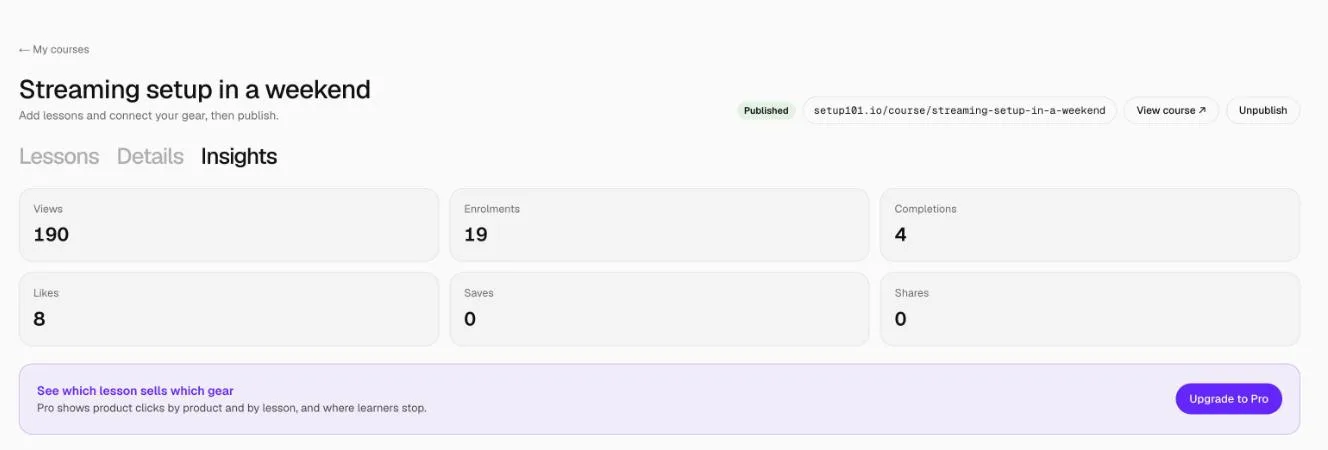
Open the course from 101 Courses and go to the Insights tab. Every plan sees views, enrolments, completions, likes, saves and shares. Pro and Pro Plus add product clicks by product and by lesson, so you can see which lesson sells which gear and where learners stop.
How to see your course insights
- Go to 101 Courses. The top of the page shows Course views, Enrolments and Completions across all your courses.
- Click Insights on a course card, or open the course and choose the Insights tab.
What do the numbers mean?
| Number | What it counts |
|---|---|
| Views | Visits to the course page |
| Enrolments | People who clicked Enrol for free |
| Completions | People who finished every lesson |
| Likes, Saves, Shares | Actions on the course page |
| Product clicks (Pro) | Clicks on product cards and gear, by product and by lesson |
| Lessons (Pro) | How many learners completed each lesson, which shows where they stop |
FAQ
Why can't I see product clicks?
They're part of the full breakdown on Pro and Pro Plus. Click Upgrade to Pro on the Insights tab.
Do linked courses have insights?
Linked courses count clicks through to the other site, shown on the Linked tab.
Related
More in 101 Courses
- What is a 101 Course on Setup101?
- How do I create a 101 Course?
- How do I add sections and lessons to a 101 Course?
- How do I add product cards to a 101 Course lesson?
- How do I publish and share my 101 Course?
- How do I link a course I sell on Teachable or Udemy?
- How do I enrol in and take a 101 Course?
- How do I edit, unpublish or delete a 101 Course?
- Which video sites can I use in a 101 Course?
Still stuck? Email support@setup101.co.